What Is Warping in 3D Printing? (And the 5 Things That Cause It)
Warping is when corners of your 3D print curl up off the bed during printing. Five specific causes — bed temp, material shrinkage, cold drafts, dirty PEI, wrong material for the part — and the fix for each.
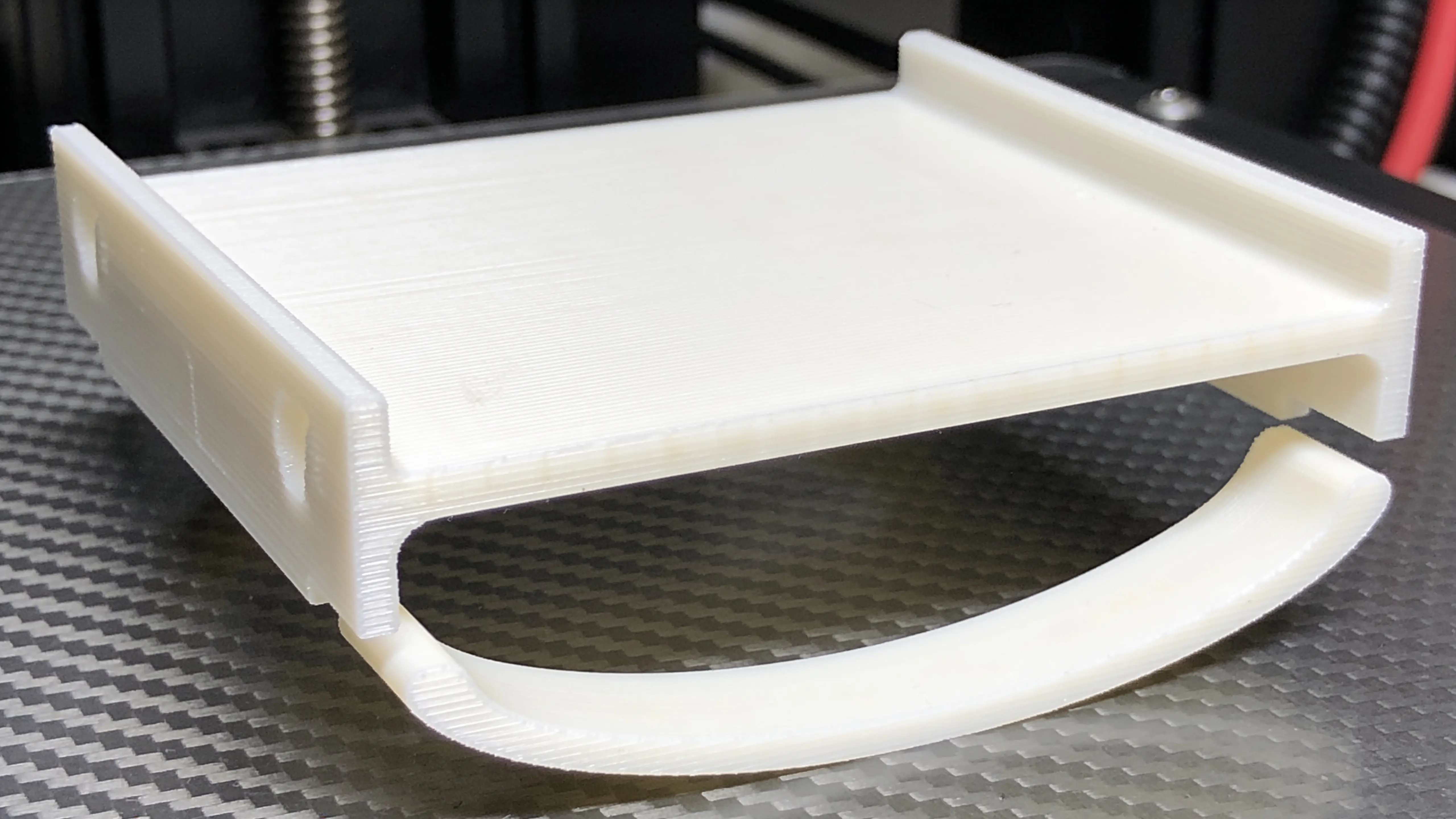
You start your 3D printer, walk away for an hour, come back to find the corners of your print have curled up off the bed like flower petals. By the time the print finishes, the bottom isn’t flat anymore — it looks more like a Pringles chip than the box you were trying to make.
That’s warping. It’s the most common quality issue in 3D printing after first-layer failures, and the most expensive when it happens on a 12-hour print. This guide explains what’s actually happening, why specific materials warp more than others, and the 5 root causes that are responsible for 95% of warped prints.
For deep troubleshooting and fixes by material, see 3D Print Warping: 3 Fixes That Actually Work. This article is the explanation behind the fixes.
The 30-second explanation
Hot plastic shrinks as it cools. The bed holds the print down by adhesion. When the shrinkage force is stronger than the adhesion, corners lift off the bed — that’s warping.
Three variables determine which side wins:
- How much the material shrinks (PLA = barely, ABS = a lot, Nylon = enormous)
- How well the bed sticks (clean PEI = strong, dirty bed = weak)
- How fast the print cools (open frame in cold room = fast cooling → high shrinkage force)
If your print warps, one of those three is out of balance. Fix that, problem solved.
What warping looks like
Three patterns, three different causes:
Corner curl
The classic. One or more corners of the print’s bottom layer have lifted up off the bed by 1-5mm. The rest of the bottom is flat. Usually starts during the print (layers 5-30) and gets worse as more layers cool above.
→ Bed adhesion problem (clean the bed, raise bed temp, check Z offset)
Edge waves
The whole bottom edge has rippled — looks like a wavy line instead of straight. Not as dramatic as corner curl but the print’s bottom isn’t flat.
→ Either material is too cold (raise bed temp) or PEI sheet is worn (replace it)
Banana-shaped bottoms
The entire bottom of a long thin part has bowed up in the middle, like a banana. This is shrinkage compounding across the long axis.
→ Material’s shrinkage exceeded what the bed could resist. Re-orient the part, use a chamber, or switch to a lower-shrinkage material.
The 5 root causes (ranked by frequency)
Cause 1: Dirty bed (40% of warping cases — yes, even though it sounds simple)
PEI build plates work by chemical bonding. Any contamination — fingerprints, sweat, dust, residue from the previous print — kills the bond in that area.
Test it: Look at the bed under bright light at an angle. New/clean PEI looks uniformly glossy. Worn or dirty PEI has matte patches or visible smudges.
Fix: Wipe the bed with 99% IPA + microfiber cloth before every print. Takes 30 seconds.
Cause 2: Bed temperature too low (25% of cases)
Bed temperature does two things: it softens the first layer so plastic flows to fill gaps (good adhesion), AND it keeps the bottom of the print warm so it shrinks less.
Common mistake: running bed temp 50°C for PLA “because the slicer suggested it.” Actual recommended is 60°C.
| Material | Correct bed temp |
|---|---|
| PLA | 60°C |
| PETG | 80°C |
| ABS / ASA | 110°C |
| Nylon | 80°C |
| TPU | 50°C |
Cause 3: Material has high shrinkage (15% of cases — and it’s a hardware problem)
Some materials shrink so much that no amount of bed adhesion can hold them down. The fundamental problem:
| Material | Shrinkage % | Warping likelihood on open frame |
|---|---|---|
| PLA | 0.30% | Rare |
| PETG | 0.40% | Sometimes |
| ABS | 0.70% | Almost always for parts >80mm |
| ASA | 0.65% | Almost always for parts >80mm |
| Nylon | 1.50% | Almost always |
| Polycarbonate | 0.70% | Yes |
For ABS, ASA, Polycarbonate, and Nylon, you need an enclosed printer with a heated chamber. The Voron 2.4, Bambu X1C / X1E, Prusa CORE One, Qidi X-Max 3, Elegoo Centauri Carbon, and FlashForge Creator 4 all have heated chambers (or can be enclosed easily). Open-frame printers (Ender 3, Bambu A1, original MK4) can print small ABS parts (<80mm) with workarounds but fail on large parts.
If you’re trying to print ABS on a Bambu A1 and getting warping, the answer isn’t “use a brim.” It’s “this printer isn’t the right tool for ABS.”
Cause 4: Cold ambient temperature (10% of cases)
Even PLA can warp if the room is cold enough. A workshop garage at 12°C cools the bottom of a print as fast as the top, defeating the bed’s warming effect.
Test: What’s the room temperature? If under 18°C, that might be it.
Fix:
- Heat the room or move printer indoors (best)
- Bump first-layer bed temp +5°C
- Loosely cover the printer (cardboard sides, t-shirt over top — NOT plastic that traps heat dangerously)
- For consistent results, get an enclosure
Cause 5: Wrong material for the geometry (10% of cases)
A long thin part (200mm × 20mm × 5mm — like a wall mounting bracket) puts way more shrinkage force on the corners than a small block does. The cumulative shrinkage across 200mm of plastic pulls the ends hard.
For long thin parts:
- Pick the lowest-shrinkage material you can (PLA over PETG, PLA-CF over PLA)
- Re-orient if possible (don’t print long thin parts flat — print them on their side)
- Add mouse ears (printed circular pads at the corners that extend bed contact area)
- Split into pieces and join with dowels
What’s NOT a root cause (but everyone blames)
Brim — A brim is a workaround, not a fix. It hides one of the 5 causes but doesn’t address it. Use sparingly for ABS where you’ve already addressed the underlying issue (chamber + clean bed + right temp); skip for PLA which shouldn’t need a brim if the other 4 things are right.
Print speed too high — Speed has a very small effect on warping (faster prints = slightly more material left hot for longer = slightly less warping). The main effect of speed is on quality and print time, not warping.
Wrong filament brand — Almost never the issue. PLA from Polymaker, Bambu Lab, Sunlu, and generics all behave similarly for warping. If a specific spool warps weirdly, it might be old/wet — drying might help.
Software / slicer bug — Effectively never the cause. Modern slicers handle thermal effects fine.
Why ABS warps so much more than PLA
Two reasons:
- Linear shrinkage: ABS shrinks 0.70% vs PLA’s 0.30% — over 2× as much
- Glass transition temperature: ABS has a higher Tg (105°C) so it stays “soft” longer during cooling. The longer it’s flexible, the more thermal contraction accumulates without setting.
This means ABS needs an enclosed printer where the chamber stays warm (40-60°C) during the entire print, keeping the part above the Tg for longer and letting the shrinkage equalize before solidifying. Open-frame printers literally cannot maintain those conditions.
Why this matters: most beginner printers (Ender 3, Bambu A1, A1 Mini) are open-frame and not designed for ABS. If you bought one of those and want to print ABS or ASA, you need to upgrade to an enclosed printer, build an enclosure, or stick with PETG (which can handle most “tough material” use cases without the warping problem).
Quick test: is your bed the problem?
Print a simple 10×10×10mm calibration cube. If it sticks fine and prints flat — your bed is good. The issue is elsewhere (material, environment, geometry).
If it lifts a corner — your bed is the problem. Run through cleaning + temperature + Z offset before doing anything else.
When warping is normal vs when it’s a problem
Some warping is built into the physics. Even on a tuned printer with a chamber, an ABS part might end up 0.1mm off-flat. That’s normal — it’s within tolerance for most use cases.
What’s NOT normal:
- Corners visibly curled (>1mm lift)
- Print detaching from bed during printing
- Bottom that’s noticeably banana-shaped after cooling
- Print failures that started flat and curled mid-print
The first three need fixing. The fourth means the bed adhesion was barely sufficient and the cumulative shrinkage exceeded it as more material cooled.
What this means for what you should print
If your printer is open-frame (Ender 3, Bambu A1 series, Prusa MK4S, Creality K1 / K2 with no enclosure), stick to:
- PLA — printable anywhere with default settings
- PETG — printable on PEI with correct bed temp
- TPU — printable but very slow
- PA-CF — printable (CF reduces nylon’s warping dramatically)
Don’t try ABS, ASA, Polycarbonate, or plain Nylon without an enclosure. You’ll fight warping forever and produce poor parts.
If your printer is enclosed (Bambu X1C, Prusa CORE One, Voron 2.4, Qidi X-Max 3, Elegoo Centauri Carbon, Snapmaker Artisan), you can run all materials. The chamber heat eliminates 90% of the warping problem.
For the broader material selection conversation, see PLA vs PETG: When to Use Which. For the in-depth warping fixes with specific bed/chamber/CAD settings, see 3D Print Warping: 3 Fixes That Actually Work. For PLA-specific warping (which has different root causes than other materials), PLA Warping Off Bed: 7 Causes and Fixes covers the cleanest path.