PLA Warping Off Bed: 7 Causes and Fixes (Stop the Curl)
PLA shouldn't warp — when it does, it's almost always bed temperature, dirty PEI, or a worn build plate. Here are the 7 actual root causes ranked by frequency, with the fixes that work.
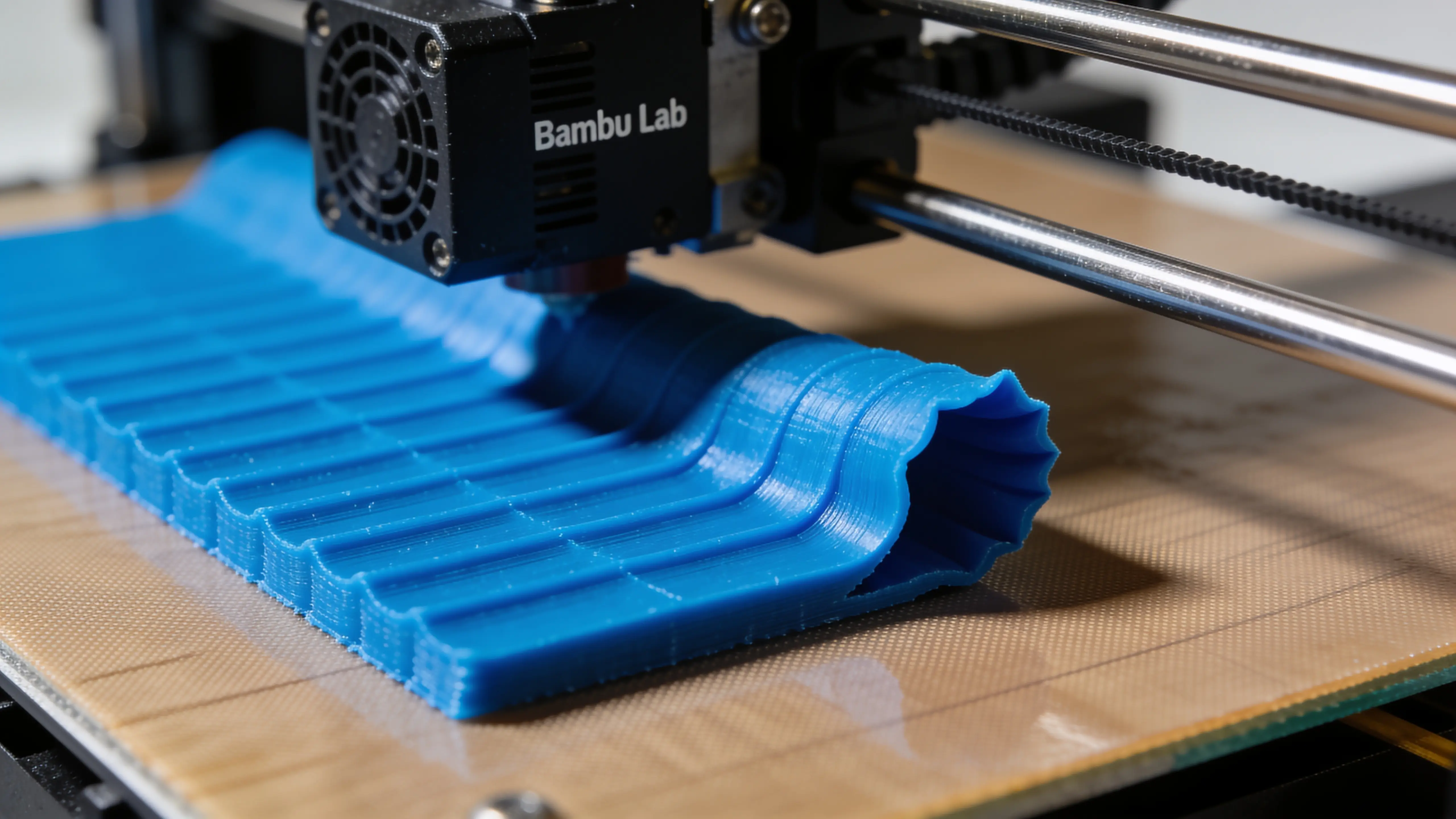
PLA is the easiest filament to print. It barely shrinks (0.30%), doesn’t need an enclosure, and sticks to almost any bed surface. So when a PLA print starts curling off the bed, your first instinct — to add a brim or raise the bed temp — is usually wrong. PLA warping has specific root causes, and 80% of them are bed-related, not material-related.
This guide ranks the 7 actual causes of PLA warping by how often they’re the culprit in real-world troubleshooting, plus the specific fixes that work. If you’ve been adding brims to every print and the next one still curls, the problem is elsewhere. Let’s find it.
For the broader warping picture (ABS, PETG, Nylon), see 3D Print Warping: 3 Fixes That Actually Work. This article focuses specifically on PLA because PLA warping has a different root-cause distribution than ABS warping.
Quick diagnostic — what kind of curling is it?
Three patterns. The fix depends on which one you have:
| Pattern | What you see | Most likely cause |
|---|---|---|
| Corner lift | One or more corners curling up off the bed, rest flat | Adhesion failure at high-stress geometry |
| Edge peeling | Long edge gradually peeling away (looks like a wave) | Bed temp too low, or worn PEI |
| Whole-bottom curl | Entire bottom layer flexing up | Dirty bed, wrong Z offset, or cold bed |
Now the 7 causes, ranked by frequency:
1. Dirty PEI sheet (the #1 cause in 60% of cases)
Fingerprints, dust, sweat from removing the previous print, hand lotion residue — anything on the PEI sheet kills adhesion. PLA sticks to PEI through a chemical bond that requires a clean surface. A single fingerprint can drop adhesion 60–80% in that area.
Diagnosis: Run a fingernail across the bed. If you feel slight resistance everywhere except where you can see your reflection clearly, the bed needs cleaning.
Fix: Wipe the entire bed with 99% isopropyl alcohol and a microfiber cloth (NOT paper towels, which leave fibers). Let dry 30 seconds before printing.
Frequency: This needs to be done before every print that matters, or at minimum once per print session. It’s the single most common reason “the printer suddenly stopped sticking.”
2. Bed temperature too low (20% of cases)
PLA’s recommended bed temperature is 60°C for the first layer. Some makers run 50°C “because that’s what the slicer suggested” but the slicer’s default is often conservative.
Diagnosis: Check your slicer’s bed temp setting. If under 60°C for first layer, bump it. Verify the actual bed temp during print (most printers display it).
Fix:
- First layer: 60°C
- After first layer: 50–55°C (drop temp slightly to reduce elephant’s foot, but don’t go below 50°C until print is well-established)
If the room is cold (<18°C), bump first layer to 65°C — the bed loses heat faster to cold ambient air.
Frequency: Common in winter / cold workshops, and on new makers who didn’t override slicer defaults.
3. Z offset wrong (10% of cases)
Z offset = how close to the bed the nozzle sits when starting the first layer. If too far away, the first lines don’t squish enough to bond to neighbors → corners lift first because they have less adjacent material to hold them down.
Diagnosis: Look at the first layer closely. If lines look round (like beads) instead of flattened (like ribbons), Z offset is too high. If lines have gaps between them, definitely too high.
Fix: Lower Z offset by 0.02–0.05mm. Test print a small flat (10×10×0.2mm). Lines should be flat ribbons with no visible gaps between them.
Frequency: Most often after replacing a nozzle, a build plate, or after moving the printer.
4. Worn PEI sheet (10% of cases)
PEI lasts 500–1500 hours of use. Eventually the surface dulls, develops matte patches, gets scratched, or the chemical bond just stops working. A worn PEI sheet looks fine but stops gripping prints reliably.
Diagnosis: Hold the PEI sheet at an angle under light. New PEI is uniformly glossy; worn PEI has matte spots or visible scratches.
Fix: Replace the PEI sheet. They’re $25–60 depending on size. Smooth PEI is best for PLA; textured PEI gives a matte print finish but slightly weaker adhesion. Most Bambu / Prusa / Creality replacements are interchangeable across brands at the same printer size.
Frequency: After 6+ months of regular printing or 500+ prints, depending on usage.
5. Cold ambient temperature (5% of cases)
A cold workshop (winter garage at 10°C, basement at 15°C) cools the print rapidly during printing. PLA’s barely-significant shrinkage becomes significant when the cool-down gradient is steep — corners contract faster than the bed-bonded center.
Diagnosis: Is the room cold? Are you printing in a garage or basement that’s not climate-controlled?
Fix:
- Raise room temperature if you can (target 20°C+)
- Bump first-layer bed temp to 65°C
- For long prints, cover the printer loosely with a t-shirt or cardboard enclosure (NOT plastic — Bambu A1 / Prusa MK4S aren’t enclosure-rated)
- Move to a warmer space if you can
Frequency: Seasonal — common in winter, rare in summer.
6. Print orientation pulling on corners (3% of cases)
Long, thin parts (rulers, wall brackets) want to warp because the cumulative shrinkage across the long axis pulls the corners. Even tiny PLA shrinkage compounds across 200mm.
Diagnosis: Is the part >150mm long, thin (less than 10mm tall), and warping at the long ends?
Fix:
- Orient the long axis along the printer’s Y (front-to-back) instead of X. Y has better positional accuracy.
- Add mouse ears (5–10mm circular pads) to the corners — they extend the corner contact area and resist shrinkage force.
- Split the part into two halves printed separately, then join with dowel pins.
Frequency: Mostly for engineering parts; rare for typical hobby prints.
7. Filament contamination or wet PLA (2% of cases)
Old PLA that’s been sitting open for 6+ months in humid air can absorb enough moisture to print poorly — including poor first-layer adhesion. Symptoms include a click-pop sound during printing (steam escaping the nozzle) and a fuzzy print surface.
Diagnosis: Listen during the first layer. Hearing intermittent clicks/pops? Filament is wet. Looking close at the first layer — is it fuzzy with little hair-like extrusions? Same cause.
Fix: Dry the PLA at 45–50°C for 4 hours. Either in a food dehydrator, an oven on its lowest setting (most home ovens are too hot — verify temp), or a dedicated filament dryer.
For the full filament drying guide (when it matters vs. when you’re wasting electricity), see Filament Drying: When It Matters.
Frequency: Rare with new spools. Common with PLA that’s been in humid storage 6+ months.
What the fix order should be
If you have a PLA print that’s warping right now, work through these in order:
- Clean the bed with IPA — solves 60% of cases, takes 2 minutes
- Check first-layer bed temp ≥ 60°C — solves another 20%, takes 30 seconds
- Verify Z offset is right — solves 10%, takes 5 minutes to test
- Check PEI sheet condition — solves 10%, replace if worn ($25–60)
- Check room temperature — if cold, address that or bump bed temp
- Re-orient long parts — if your part is long and thin
- Dry the filament — if you suspect old spool
Don’t skip to step 7 before doing step 1. PLA filament rarely needs drying; cleaning the bed is what 80% of “warping” prints actually need.
What about brims?
A brim is not a fix for PLA warping. It’s a workaround that masks one of the seven causes above.
- If you’re cleaning the bed properly and your PEI is good and your Z offset is dialed, you don’t need a brim for PLA prints. Period.
- If you’re adding a brim because PLA is warping, you have a root cause that the brim is hiding. The root cause will catch up eventually — usually when a print finally fails despite the brim, or when the brim itself starts lifting (because the adhesion problem affects the brim too).
- Use brims for PETG (sometimes needed), ABS (definitely needed), and Nylon (mandatory). Not PLA.
Why PLA “shouldn’t” warp
PLA’s linear shrinkage is 0.30% — about half of PETG’s, a quarter of ABS’s, and a fraction of Nylon’s. The thermal contraction force on a typical PLA print is well within what a clean PEI sheet at 60°C can resist with margin.
When a PLA print is warping, it’s almost always not a material problem — it’s an environment or bed problem. Fix that and 99% of PLA warping disappears.
For the warping math across all materials (why ABS warps so much more than PLA, when to use an enclosure, mouse-ear technique), 3D Print Warping: 3 Fixes That Actually Work covers the rest.
Common questions
Will glue stick fix my warping? It hides the symptom but adds residue that needs cleaning between prints. Not recommended for PLA — clean PEI works better. Reserve glue stick for ABS on glass beds.
Should I use a heated chamber for PLA? No. PLA prints worse in a heated chamber because PLA needs to cool quickly to set properly. Heated chambers are for ABS, ASA, PC, and Nylon.
Is my Bambu A1 / Prusa MK4S / Creality K1 supposed to handle PLA without warping? Yes. All three printers’ default PLA profiles produce non-warping prints on clean PEI. If yours isn’t, run through the 7 causes above.
What if it warps on the first layer specifically? That’s a first-layer issue, not a warping issue. See First Layer Problems: A Real Diagnostic Guide — the symptoms and fixes are different.